
Complement to the Commission de la construction du Québec (CCQ) coverage
The Complement to the CCQ coverage allows you to determine the SOLO Disability Income benefit amount that can be offered to individuals who work in the construction sector and have the MÉDIC Construction plan. This means that in the event of a disability, your client can submit a claim for each coverage they have and get peace of mind knowing their monthly expenses are covered.
Any change to an insured person’s work situation or insurance plan may affect the monthly amount paid in the event of a claim. We recommend that you review your clients’ needs on a regular basis to check that SOLO Disability Income coverage is still appropriate for their situation.

Contact our Business development team – Insurance for more information.
You can use the Complement to the CCQ coverage calculator to determine if a person insured under the CCQ plan has any gaps in coverage that could be filled by the SOLO Disability Income product.
Benefits
- Highlights the potential of disability insurance
- Covers all the bases: SOLO Disability Income, MÉDIC Construction and Employment Insurance
- Provides a clear and impactful visual tool
Product involved
- SOLO Disability income
Type of coverage
- Individual
Use the Complement to the CCQ coverage calculator to determine any gaps in coverage for someone insured under the CCQ plan.
You can find this in the illustration tool, under the Strategies tab, in the Quebec construction workers menu.
Once you’ve done the calculation, you’ll be able to choose the amount to offer and produce your illustration.
How to use this calculator
- Click on the Strategies tab
- Open the Concepts section
- In the Quebec construction workers menu, select Complement to CCQ coverage
- Download the calculator by clicking Export to Excel.
Open the downloaded file through your browser or in your Downloads folder
You have 60 minutes to open the file and access the data in the illustration. After that, you'll have to download the spreadsheet again. - 5. Activate content and macros.

- This screen will appear for the selected product
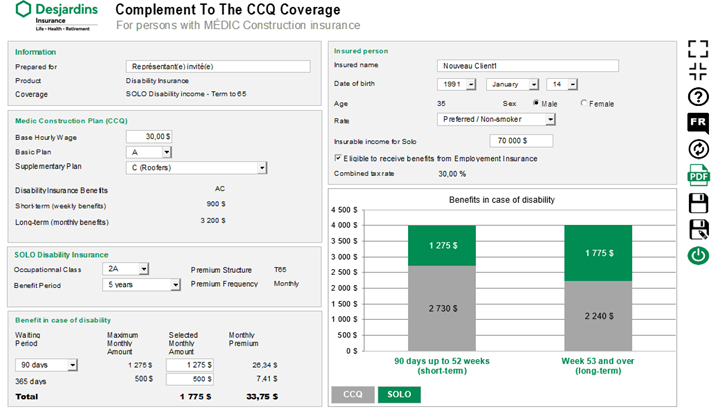
- Check that the proposed insured’s information and the insurance coverage are accurate. You can change this information directly in the Excel file if you need to.
- Enter the information specific to the MÉDIC Construction plan for the proposed insured. The graph will automatically adjust based on the information entered, and the maximum amount available for SOLO Disability Income will be displayed.
- Click the PDF icon to generate the report.
- Once you’ve determined the SOLO coverage amount, produce your illustration and add the additional coverage, if applicable.