
Insured Retirement Plan (IRP)
The Insured Retirement Plan is a financial strategy that provides clients with permanent life insurance coverage and the opportunity to supplement their retirement income. This strategy is ideal for clients who have maxed out their RRSP or pension plan contribution limits.
- How it works
- Target clientele
- Illustration creation
- Sales material
- Permanent life insurance coverage need
Your client purchases a tax-exempt permanent life insurance policy for their coverage need.
- Cash value growth
Life insurance coverage allows the client to accumulate cash value that grows tax-deferred, as long as it is not withdrawn from the policy.
- Use of the policy as collateral
The client can later use the policy’s cash value as collateral for a loan.
- Supplemental income
The borrowed funds are non-taxable, and the client can use them to supplement their retirement
- Wealth transfer
Upon the client’s death, the proceeds of the life insurance policy are used to repay the loan. The balance is paid tax-free to the client’s beneficiaries.
Benefits
- The client can receive supplemental retirement income along with the peace of mind offered by life insurance coverage.
- The policy’s cash value grows deferred.
- The life insurance policy counts as an asset for your client. This means they can access the cash value of their coverage without giving up ownership when they use the policy as collateral for a loan from a financial institution.
- Upon the client’s death, the proceeds of the life insurance policy are paid tax-free.
Eligible products
Whole life insurance:
- Whole Life Guaranteed 10 Pay
- Whole Life Guaranteed 15 Pay
- Whole Life Guaranteed 20 Pay
- Whole Life Guaranteed to 65
- Whole Life Guaranteed to 100
Participating whole life insurance:
- 5 Pay PAR
- Accelerated Growth 10 Pay
- Accelerated Growth 20 Pay
- Accelerated Growth to 100
- Estate Enhancer 10 Pay
- Estate Enhancer 20 Pay
- Estate Enhancer to 100
Dividend options
- Paid-up additions (PUAs) with or without Premium Offset
- Enhanced insurance (EI) with or without Premium Offset
Universal life insurance:
- Term 10
- Term 20
- Term to 100
The accumulated fund of the universal life policy must be greater than $0.
Types of coverage
- Individual
- Joint first-to-die
- Joint last-to-die
- Joint last-to-die, paid-up first death
The Insured Retirement Plan (IRP) is suitable for clients who:
- are Canadian residents
- have liquidities available to invest
- want supplemental retirement income
- have maxed out their RRSP or pension plan contribution limits
- are looking for a long-term financial planning strategy
- are not opposed to holding debt
- want to defer and pay less tax
- hope to leave a tax-free legacy to their loved ones
Target age: 30 to 55
Clients must be in good health to be eligible standard for the permanent life insurance.
Here are a few questions to ask your clients:
- Are you interested in leaving a tax-free legacy to your loved ones?
- Have you maxed out your RRSP and TFSA contributions?
- Do you want quick access to cash in an emergency?
- Are you interested in supplemental retirement income?
- Do you need help with estate planning?
- Are you interested in long-term planning strategies?
To create the report to illustrate the IRP strategy, you first need to enter the product features of the chosen product based on the following:
- Do not add any additional coverage, since it's not taken into account when comparing amounts in the report.This applies to the presentation and is not a constraint for selling additional coverage.
- It is recommended to choose the annual payment method.
Procedure to illustrate the Insured Retirement Plan:
- Click the Sales Strategies tab of the illustration software.
- Open the Concepts section.
- From the drop-down menu, select Insured Retirement Plan in the Affluent section.
- Click Export to download the strategy. The data in the illustration will be transferred to a spreadsheet.
- Once your browser has finished downloading the spreadsheet, open it in the browser or from the Downloads folder. You'll have 60 minutes to open the file and access the data in the illustration. After that, you'll have to download the spreadsheet again.
- Enable macros and editing.

- This screen will appear for the selected product.
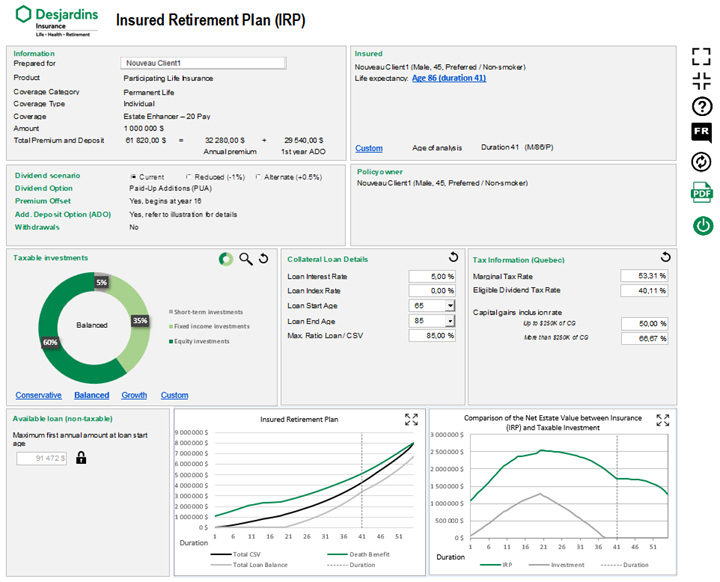
- Make sure the information about the proposed insured and the insurance coverage is correct. If it isn't, exit the page and restart the illustration.
- Confirm or change the name of the client the strategy is being prepared for.
- In the Insureds section, select the period you want to analyze. Click the Personalize link to select the life expectancy of one of the proposed insureds, the equivalent age or any other period. The time selected is indicated on the charts by a dotted vertical line.
- Create a hypothetical portfolio in the Taxable Investment section, allocating to interest, dividend and capital gain income. The allocation must always add up to 100%. For each type of investment, choose a rate of return that's realistic and takes the current situation into account. This investment portfolio will be compared to the values of insurance policy. We assume that the amounts invested in both scenarios are the same. You can view the investment composition as a chart or a table, depending on your preference.
- In the Collateral Loan Details section: Enter the loan interest rate, the annual indexation rate (if desired) and the start and end dates of the client’s payments. The maximum loan-to-cash value ratio is 85%. We do not recommend changing it.
- The tax rates shown are in the calculations vary by province. These rates are updated and do not need to be changed.
- Once you've entered all the relevant information, the tool will calculate the maximum annual loan starting at the selected age. To reduce this amount, click the lock icon to unlock it. All the other parameters are set to match the initial assumptions. If you click the lock icon again, the initial maximum values will reappear, and the other variables can be changed as needed.
- Two interactive charts will show how the results change based on the data you enter.
- The first shows the policy's cash value and death benefit in relation to the accumulated loan (rate, term, indexation, etc.).
- The second shows the net value that will go to the estate for the insurance with the IRP strategy and the taxable investment held by the client
- Click the PDF button and the report will open as a PDF.
- A copy of the report is automatically saved in the /Downloads/Desjardins. You can also save it manually.
- Go back to the Insured Retirement Plan input screen and click Exit.
You can only use the saved PDF copy of the report. To present the strategy again, you'll need to create a new illustration and download it from the Strategies tab.